

How to Subscribe in ProgCentral
Instructions on Subscription
If you do not have access to ProgCentral, please contact your Progressive Sales partner.
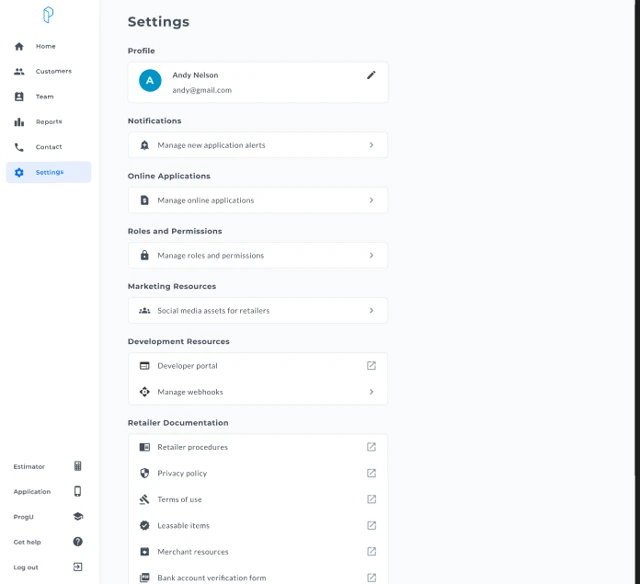
Navigate to:
Settings → Development Resources → Manage Webhooks
This page allows you to view, create, edit, enable, disable, or delete webhook subscriptions.
How to Create A Subscription
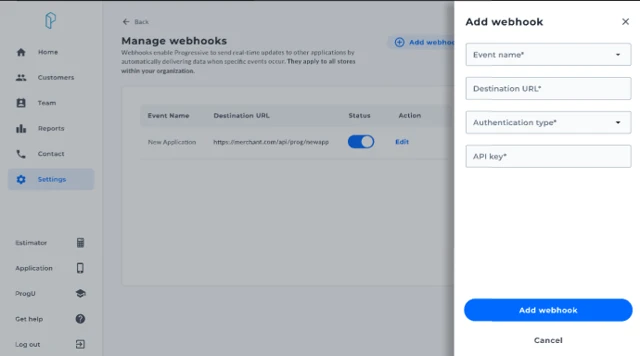
Click Add Webhook
A slide-out panel will appear
Complete all required fields
Required Fields
Event Name - New Application - Contracts Received
Destination URL - The HTTPS endpoint in your CRM or system that will receive the data
Authentication Type - API Key - Client Credentials
Authentication Details - API Key, or - Client ID and Client Secret
All fields are required. If a field is missing or invalid, it will be highlighted and the Add Webhook button will remain disabled.
Click Add Webhook to save
Once created: - The webhook is automatically enabled - A confirmation message appears
Updated 4 months ago