

[old] Installation
Custom Tax Logic
The Progressive Leasing cartridge may need to make tax adjustments to finalized orders. Any tax service integrations need to be below progressiveleasing_sg_changes in cartridge precedence. Please ensure progressiveleasing_sg_changes (optional) is inserted to the left of any tax integrations in the cartridge path. This cartridge contains all custom code changes needed and can be used to setup PGL quickly.
Step 1: Add Cartridges to Demandware Admin
The progressive Leasing LINK integration uses the following cartridges: int_progressiveleasing, int_progressiveleasing_sfra, int_progressiveleasing_sg, progressiveleasing_sfra_changes and progressiveleasing_sg_changes.
- Navigate to "Administration → Sites → Manage Sites → <Merchant Site> → Settings"
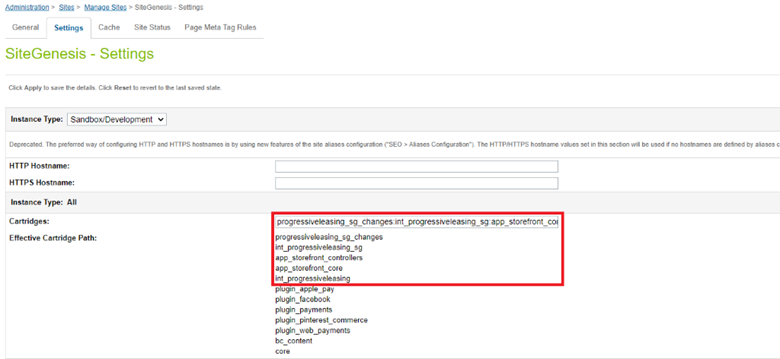
- Add the cartridge names to Cartridges path as shown in screenshot below:
The site effect path should be ‘progressiveleasing_sg_changes:int_progressiveleasing_sg:app_storefront_controllers:app_storefront_core:int_progressiveleasing’.
“progressiveleasing_sg_changes” is optional and contains all custom code changes. It can be used for quick setup.
Step 2: Import Progressive Leasing Metadata
Replace Library ID's
Make sure to replace library ID’s under libraries folder ‘RefArchSharedLibrary’ and ‘SiteGenesisSharedLibrary’ and in library.xml file with the correct ID’s. Make sure to rename the folders inside ‘sites’ directory with the correct site ID. Make sure to replace ‘RefArch’ and ‘SiteGenesis’ in access-roles.xml with correct site ID.
- Copy the metadata.zip file from Progressive Leasing cartridge’s Metadata folder to a temporary file location.
- Unzip the file.
- In metadata/sites/SiteGenesis, change the names of the folders “SiteGenesis” and “RefArch” to the site ID for which Progressive Leasing is being installed.
- In metadata/libraries , change the names of the folders “RefArchSharedLibrary” and “SiteGenesisSharedLibrary” to the correct library ID.
- In metadata/access-roles.xml, replace “RefArch” and “SiteGenesis” with correct site ID.
- Use a zip utility to compress the modified folder.
- Navigate to Site Development à Site Import & Export
- Select metadata.zip file and click on “Import” and complete the import process through the interface.
- The Content Asset, Payment Method, Services, Site Preferences, System Object’s attributes will be imported
- The details on services are described in section 3.3.
- The details on Progressive Leasing Custom Preferences are described in section 5.2.1. For further details on system objects see section 5.2.2 and 5.2.3.
Step 3: Add Progressive Hooks
Add Progressive Leasing Head
Modify htmlhead_UI.isml template to include progressiveleasinghead.isml:
<iscontent type="text/html" charset="UTF-8" compact="true"/>
<iscomment>Custom Start: Include progressive leasing header </iscomment>
<isinclude template="includes/progressiveleasinghead"/>
<iscomment>Custom End: Include progressive leasing header </iscomment>
The template can be located at following path:
“progressiveleasing_sg_changes /cartridge/templates/default/components/header/htmlhead_UI.isml”
Add Progressive Leasing Footer
Modify footer_UI.isml template to include progressiveleasingfooter.isml:
<iscomment>Custom Start: Include progressive leasing footer </iscomment>
<isinclude template="includes/progressiveleasingfooter"/>
<iscomment>Custom End: Include progressive leasing footer </iscomment>
The template may be located at the following path:
“progressiveleasing_sg_changes /cartridge/templates/default/components/footer/footer_UI.isml”
Add Product Tile Messaging
To display leasable product messaging on the product tile include following module in producttitle.isml:
<iscomment>Custom Start: Include progressive leasing product tile messaging </iscomment>
<isinclude template="util/plmodules.isml" />
<isprogressivetilemessaging product="${Product}" />
<iscomment>Custom End: Include progressive leasing product tile messaging </iscomment>
This template may be located at following path;
“progressiveleasing_sg_changes /cartridge/templates/default/product/producttile.isml”
Add Product Details Messaging
To display leasable product messaging alongside product price on product details page, include following module in productcontent.isml:
<iscomment>Custom Start: Include progressive leasing pdp messaging </iscomment>
<isinclude template="util/plmodules.isml" />
<isprogressivepdpmessaging product="${pdict.Product}" />
<iscomment>Custom End: Include progressive leasing pdp messaging </iscomment>
The template may be located at following path;
“progressiveleasing_sg_changes /cartridge/templates/default/product/productcontent.isml”
Add Cart Messaging
To display messaging on cart page, include following template in cart.isml.
<iscomment>Custom Start: PGL Error Messaging</iscomment>
    <div>
        <isif condition="${!empty(pdict.pglErrorMsg)}" >
            <h3 class="error-form">${pdict.pglErrorMsg}</h3>
        </isif>
    </div>
    <iscomment>Custom End: PGL Error Messaging</iscomment>
<iscomment>Custom Start: Include progressive leasing cart messaging </iscomment>
<isinclude template="components/progressiveleasing/cartmessaging"/>
<iscomment>Custom End: Include progressive leasing cart messaging </iscomment>
The template may be located at following path:
“progressiveleasing_sg_changes /cartridge/templates/default/checkout/cart/cart.isml”
Add Progressive Leasing Payment Method
In order to provide the progressive leasing payment method in the checkout billing page, include progressiveleasing.isml in paymentmethods.isml template:
<iscomment>Custom Start: Include progressive leasing </iscomment>
<isinclude template="checkout/billing/progressiveleasing" />
<iscomment>Custom End: Include progressive leasing </iscomment>
This template can be located at following path:
“progressiveleasing_sg_changes /cartridge/templates/default/checkout/billing/paymentmethods.isml”
Add Progressive Leasing Cart Validator
For validating leasable and non-leasable products, ProgressiveLeasingValidator should be included in the Cart.js controller. Following custom code should be added:
i) Import ProgressiveLeasingValidator script at the top of the controller
//Custom Start: Include progressive leasing
var ProgressiveLeasingValidator = require('*/cartridge/scripts/validator/ProgressiveLeasingValidator');
//Custom End: Include progressive leasing
ii) Add the following code in the 'show': function:
// Custom Start: PGL error message

var reqParam = request.httpParameterMap;
var pglErrorMsg = !empty(reqParam.get('pglErrorMsg')) ? reqParam.get('pglErrorMsg').value : '';

// Custom End: PGL error message

cartForm.get('shipments').invalidate();

app.getView('Cart', {
    cart: app.getModel('Cart').get(),
    RegistrationStatus: false,
    pglErrorMsg: pglErrorMsg
}).render('checkout/cart/cart');
iii) Add the following code in the 'checkoutCart': function, before validationResult = cart.validateForCheckout();
//Custom Start: Include progressive leasing validator
if(!ProgressiveLeasingValidator.validateCart()) {
    response.redirect(URLUtils.https('Cart-Show'));
    session.privacy.showProgressivingLeasingMessage = true;
    return null;
 }
//Custom End: Include progressive leasing validator
The Cart controller may be located at the following path:
“progressiveleasing_sg_changes /cartridge/controllers/Cart.js”
Add Progressive Leasing Order Confirmation Service Call
To confirm order on PGL side a service call is needed when order is confirmed on SFCC storefront in COPlaceOrder.js controller. Following custom code should be added:
i) Import PGL scripts at the top of the controller
Custom Start: PGL Script Modules
var plConstants = require('*/cartridge/scripts/util/progressiveleasingConstants');
var plHelpers = require('*/cartridge/scripts/helper/progressiveLeasingHelper');
var plService = require('*/cartridge/scripts/service/progressiveLeasingService');
//Custom End: PGL Script Modules
ii) Add the following code in the 'start' function on line 185-189;
// Custom Start: PGL order confirmation service call
if (plConstants.PL_ENABLED && !orderPlacementStatus.error && plHelpers.isPaymentPGL(order)) {
    plService.confirmOrder(order.custom.pglLeaseID);
	}
// Custom Start: PGL order confirmation service call
The COPlaceOrder may be located at “progressiveleasing_sg_changes /cartridge/controllers/ COPlaceOrder.js”
Add Order Details Messaging
In order to display progressive leasing id on the order detail/confirmation page, include following module in orderdetails.isml (the module should be included inside the payment-type section):
<iscomment>Custom Start: Include progressive leasing order messaging </iscomment>
<isprogressiveordermessaging paymentInstr=${paymentInstr} />
<iscomment>Custom End: Include progressive leasing order messaging </iscomment>
This template can be located at following path:
“progressiveleasing_sg_changes /cartridge/templates/default/components/order/orderdetails.isml”
Add Support for Progressive Leasing Orders
In order to handle PGL order, include the following code in calculate.js file.
Require PGL scripts,
var ProgressiveLeasing = require('*/cartridge/scripts/service/progressiveLeasingService');
var PLConstants = require('*/cartridge/scripts/util/progressiveleasingConstants');
Create a function removeTax(basket) like,
// Only remove taxes if:
//  - It's a PGL transaction
//  - The billing step has been completed
function removeTax(basket) { // eslint-disable-line
    if (!empty(basket)) {
        var shipments = basket.getShipments().iterator();
        while (shipments.hasNext()) {
            var shipment = shipments.next();
            Transaction.wrap(function () { // eslint-disable-line no-loop-func
                var lineItemIter = shipment.getAllLineItems().iterator();
                while (lineItemIter.hasNext()) {
                    var lineItem = lineItemIter.next();
                    var taxBasis = new dw.value.Money(0.00, 'USD');
                    lineItem.updateTax(0.0, taxBasis);
                }
                basket.updateTotals();
            });
        }
    }
}
Create a function "prepareShippingMethod(basket)" like,
/**
 * Prepare Shipping method
 *
 * @param {Object} basket - The basket containing the elements to be computed
 */
function prepareShippingMethod(basket) {
    if (!empty(basket)) {
        var shipment = basket.getDefaultShipment();
        var shippingMethod = shipment.getShippingMethod();
        if (empty(shippingMethod)) {
            Transaction.wrap(function () {
                var defaultShippingMethod = ShippingMgr.getDefaultShippingMethod();
                shipment.setShippingMethod(defaultShippingMethod);
            });
        }
    }
}
Include custom logic in "calculate" function on starting lines,
var isPGLPayment = false;
var paymentInstrumentIter = basket.getPaymentInstruments().iterator();
while (paymentInstrumentIter.hasNext()) {
    var paymentInstrument = paymentInstrumentIter.next();
    if (paymentInstrument.paymentMethod === ProgressiveLeasing.METHOD_PROGRESSIVE_LEASING) {
        isPGLPayment = true;
    }
}

prepareShippingMethod(basket);
Replace tax removing logic in "calculate" function where calculateTax(basket) is invoked,
// Custom Start: PGL condition to remove tax
        if (PLConstants.PL_ENABLED && PLConstants.PL_EXCLUDETAX && isPGLPayment && session.forms.billing.fulfilled.value) {
            removeTax(basket);
        } else {
            calculateTax(basket);
        }
        // Custom End
Make sure the hook "dw.ocapi.shop.basket.calculate" is pointing to the appropriate calculate.js script
This script can be located at following path:
“progressiveleasing_sg_changes /cartridge/scripts/cart/calculate.js”
Add Frontend Scripts
A template providing the Progressive Leasing CSS and JavaScript should be included in scripts.isml:
<iscomment>Custom Start: Include progressive leasing </iscomment>
<isinclude template="include/progressiveLeasingIncludes" />
<iscomment>Custom End: Include progressive leasing </iscomment>
A template providing the Progressive Leasing CSS and JavaScript should be included in homePage.isml:
<iscomment>Custom Start: Include progressive leasing </iscomment>
<isinclude template="include/progressiveLeasingIncludes" />
<iscomment>Custom End: Include progressive leasing </iscomment>
A template providing the Progressive Leasing CSS and JavaScript should be included in searchResultsNoDecorator.isml:
<iscomment>Custom Start: Include progressive leasing </iscomment>
<isinclude template="include/progressiveLeasingIncludes" />
<iscomment>Custom End: Include progressive leasing </iscomment>
Add Product Tile Messaging
To display leasable product messaging on the product tile include following template in productTitleFooter.isml:
<iscomment>
        This template is overridden to include Progressive Leasing
        Tile Messaging Template. In actual integration simply include
        this template to desired location.
    </iscomment>
<iscomment>Custom Start: Include progressive leasing tile messaging </iscomment>
<isinclude template="components/progressiveleasing/tileMessaging" />
<iscomment>Custom End: Include progressive leasing tile messaging </iscomment>
See default overridden templates in the cartridge for reference:
“/progressiveleasing_sfra_changes /cartridge/templates/default/product/ productTileFooter.isml
Add Product Details Messaging
To display leasable product messaging alongside product price on product details page, include following template in productDetails.isml:
<iscomment>Custom Start: Include progressive leasing js and css </iscomment>
<isinclude template="include/progressiveLeasingIncludes" />
<iscomment>Custom Start: Include progressive leasing js and css </iscomment>
<iscomment>Custom Start: Include progressive leasing pdp messaging </iscomment>
<isinclude template="components/progressiveleasing/pdpMessaging"/>
<iscomment>Custom End: Include progressive leasing pdp messaging </iscomment>
See default overridden templates in the cartridge for reference:
“/progressiveleasing_sfra_changes /cartridge/templates/default/product/ productDetails.isml”
Add Cart Messaging
To display messaging on cart page, include following template in cart.isml:
<iscomment>Custom Start: PGL Error Messaging</iscomment>
<div class="container">
    <div class="row">
        <div class="col-12 text-center">
            <isif condition="${!empty(pdict.pglErrorMsg)}" >
                <h3 class="text-danger">${pdict.pglErrorMsg}</h3>
            </isif>
        </div>
    </div>
</div>
<iscomment>Custom End: PGL Error Messaging</iscomment>
<iscomment>Custom Start: Include progressive leasing cart messaging </iscomment>
<div class="col-sm-7 col-md-8">
    <isinclude template="components/progressiveleasing/cartMessaging" />
</div>
<iscomment>Custom End: Include progressive leasing cart messaging </iscomment>
See default overridden templates in the cartridge for reference:
“/progressiveleasing_sfra_changes /cartridge/templates/default/cart/ cart.isml”
Step 4: Add Progressive Leasing Payment Method
In order to provide the progressive leasing payment method in the checkout billing page, include the custom templates in paymentOptionsTab.isml and paymentOptionsContent.isml template:
1) Include following template along with condition in paymentOptionsTab.isml template
<iscomment>
    This template is overridden to include Progressive Leasing
    Payment Method Tab Page Template. In actual integration
    simply include this template to desired location.
    </iscomment>
<iscomment>Custom Start: Include progressive leasing tab with payment options condition </iscomment>
<isif condition="${paymentOption.ID === 'PROGRESSIVE_LEASING'}">
    <isinclude template="checkout/billing/progressiveLeasingTab" />
</isif>
<iscomment>Custom End: Include progressive leasing tab with payment options condition </iscomment>
2) Include following template along with condition in paymentOptionsContent.isml
<iscomment>
    This template is overridden to include Progressive Leasing
    Payment Method Content Page Template. In actual integration
    simply include this template to desired location.
    </iscomment>
<iscomment>Custom Start: Include progressive leasing content with payment options </iscomment>
<isif condition="${paymentOption.ID === 'PROGRESSIVE_LEASING'}">
    <isinclude template="checkout/billing/progressiveLeasingContent" />
</isif>
<iscomment>Custom End: Include progressive leasing content with payment options </iscomment>
See the default overridden templates in the cartridge for reference:
“/progressiveleasing_sfra_changes /cartridge/templates/default/checkout/billing/paymentOptionsTab.isml”
“/progressiveleasing_sfra_changes /cartridge/templates/default/checkout/billing/paymentOptionsContent.isml”
Add Progressive Leasing Payment Summary
In order to provide the progressive leasing payment summary in the order conformation page, include the following custom template into paymentOptionsSummary.isml template:
<iscomment>Custom Start: Include progressive leasing summary with payment method condition </iscomment>
<isif condition="${payment.paymentMethod === 'PROGRESSIVE_LEASING'}">
    <isinclude template="checkout/billing/paymentOptions/progressiveLeasingSummary" />
</isif>
<iscomment>Custom End: Include progressive leasing summary with payment method condition </iscomment>
See the default overridden templates in the cartridge for reference:
“/progressiveleasing_sfra_changes /cartridge/templates/default/checkout/billing/paymentOptions/paymentOptionsSummary.isml”
Add Progressive Leasing Payment Error
In order to provide the progressive leasing payment error, include the following custom template into checkout.isml template:
<iscomment> Custom Start: Add logic to render Progressive Leasing Payment Error</iscomment>
<isif condition="${!empty(pdict.paymentError)}" >
   <div class="alert alert-danger" role="alert">
      <p class="error-message-text">${pdict.paymentError}</p>
   </div>
</isif>
<iscomment> Custom End </iscomment>
See the default overridden templates in the cartridge for reference:
“/progressiveleasing_sfra_changes/cartridge/templates/default/checkout/checkout.isml”
Updated over 3 years ago